Numpy 学习 [TOC]
常量 函数 含义及其备注 np.nan空值,np.nan!=np.nan np.isnan返回同样维度的 boolean array np.inf正无穷大 np.pi圆周率 np.e自然常数
数据类型 常见数据类型 类型 备注 说明 bool_ = bool8 8位 布尔类型 int8 = byte 8位 整型 int16 = short 16位 整型 int32 = intc 32位 整型 int_ = int64 = long = int0 = intp 64位 整型 uint8 = ubyte 8位 无符号整型 uint16 = ushort 16位 无符号整型 uint32 = uintc 32位 无符号整型 uint64 = uintp = uint0 = uint 64位 无符号整型 float16 = half 16位 浮点型 float32 = single 32位 浮点型 float_ = float64 = double 64位 浮点型 str_ = unicode_ = str0 = unicode Unicode 字符串 datetime64 日期时间类型 timedelta64 表示两个时间之间的间隔
创建数据类型 每个内建类型都有一个唯一定义它的字符代码,如下:
字符 对应类型 备注 b boolean ‘b1’ i signed integer ‘i1’, ‘i2’, ‘i4’, ‘i8’ u unsigned integer ‘u1’, ‘u2’ ,‘u4’ ,‘u8’ f floating-point ‘f2’, ‘f4’, ‘f8’ c complex floating-point m timedelta64 表示两个时间之间的间隔 M datetime64 日期时间类型 O object S (byte-)string S3表示长度为3的字符串 U Unicode Unicode 字符串 V void
1
2
3
4
5
6
7
a = np . dtype ( 'b1' )
print ( a . type ) # <class 'numpy.bool_'>
print ( a . itemsize ) # 1
a = np . dtype ( 'f2' )
print ( a . type ) # <class 'numpy.float16'>
print ( a . itemsize ) # 2
时间日期和时间增量 datetime64 在 numpy 中,我们很方便的将字符串转换成时间日期类型 datetime64(datetime 已被 python 包含的日期时间库所占用)。
datatime64是带单位的日期时间类型,其单位如下:
日期单位 代码含义 时间单位 代码含义 Y 年 h 小时 M 月 m 分钟 W 周 s 秒 D 天 ms 毫秒 - - us 微秒 - - ns 纳秒 - - ps 皮秒 - - fs 飞秒 - - as 阿托秒
注意:
1秒 = 1000 毫秒(milliseconds) 1毫秒 = 1000 微秒(microseconds) 1
2
3
4
5
6
7
8
9
10
11
12
13
14
15
16
import numpy as np
a = np . datetime64 ( '2020-03-01' )
print ( a , a . dtype ) # 2020-03-01 datetime64[D]
a = np . datetime64 ( '2020-03' )
print ( a , a . dtype ) # 2020-03 datetime64[M]
a = np . datetime64 ( '2020-03-08 20:00:05' )
print ( a , a . dtype ) # 2020-03-08T20:00:05 datetime64[s]
a = np . datetime64 ( '2020-03-08 20:00' )
print ( a , a . dtype ) # 2020-03-08T20:00 datetime64[m]
a = np . datetime64 ( '2020-03-08 20' )
print ( a , a . dtype ) # 2020-03-08T20 datetime64[h]
从字符串创建 datetime64 类型时,可以强制指定使用的单位。
1
2
3
4
5
6
7
8
9
10
import numpy as np
a = np . datetime64 ( '2020-03' , 'D' )
print ( a , a . dtype ) # 2020-03-01 datetime64[D]
a = np . datetime64 ( '2020-03' , 'Y' )
print ( a , a . dtype ) # 2020 datetime64[Y]
print ( np . datetime64 ( '2020-03' ) == np . datetime64 ( '2020-03-01' )) # True
print ( np . datetime64 ( '2020-03' ) == np . datetime64 ( '2020-03-02' )) #False
从字符串创建 datetime64 数组时,如果单位不统一,则一律转化成其中最小的单位。
1
2
3
4
5
import numpy as np
a = np . array ([ '2020-03' , '2020-03-08' , '2020-03-08 20:00' ], dtype = 'datetime64' )
print ( a , a . dtype )
# ['2020-03-01T00:00' '2020-03-08T00:00' '2020-03-08T20:00'] datetime64[m]
使用arange()创建 datetime64 数组,用于生成日期范围。
1
2
3
4
5
6
7
import numpy as np
a = np . arange ( '2020-08-01' , '2020-08-10' , dtype = np . datetime64 )
print ( a )
# ['2020-08-01' '2020-08-02' '2020-08-03' '2020-08-04' '2020-08-05'
# '2020-08-06' '2020-08-07' '2020-08-08' '2020-08-09']
print ( a . dtype ) # datetime64[D]
datetime64 和 tmedelta64 运算 timedelta64 表示两个 datetime64 之间的差 。timedelta64 也是带单位的,并且和相减运算中的两个 datetime64 中的较小的单位保持一致。
1
2
3
4
5
6
7
8
9
10
11
12
13
14
import numpy as np
a = np . datetime64 ( '2020-03-08' ) - np . datetime64 ( '2020-03-07' )
b = np . datetime64 ( '2020-03-08' ) - np . datetime64 ( '202-03-07 08:00' )
c = np . datetime64 ( '2020-03-08' ) - np . datetime64 ( '2020-03-07 23:00' , 'D' )
print ( a , a . dtype ) # 1 days timedelta64[D]
print ( b , b . dtype ) # 956178240 minutes timedelta64[m]
print ( c , c . dtype ) # 1 days timedelta64[D]
a = np . datetime64 ( '2020-03' ) + np . timedelta64 ( 20 , 'D' )
b = np . datetime64 ( '2020-06-15 00:00' ) + np . timedelta64 ( 12 , 'h' )
print ( a , a . dtype ) # 2020-03-21 datetime64[D]
print ( b , b . dtype ) # 2020-06-15T12:00 datetime64[m]
生成 timedelta64时,要注意年(‘Y’)和月(‘M’)这两个单位无法和其它单位进行运算(一年有几天?一个月有几个小时?这些都是不确定的)。
 1
 2
 3
 4
 5
 6
 7
 8
 9
10
11
12
13
14
15
16
17
import numpy as np
a = np . timedelta64 ( 1 , 'Y' )
b = np . timedelta64 ( a , 'M' )
print ( a ) # 1 years
print ( b ) # 12 months
c = np . timedelta64 ( 1 , 'h' )
d = np . timedelta64 ( c , 'm' )
print ( c ) # 1 hours
print ( d ) # 60 minutes
print ( np . timedelta64 ( a , 'D' ))
# TypeError: Cannot cast NumPy timedelta64 scalar from metadata [Y] to [D] according to the rule 'same_kind'
print ( np . timedelta64 ( b , 'D' ))
# TypeError: Cannot cast NumPy timedelta64 scalar from metadata [M] to [D] according to the rule 'same_kind'
timedelta64 的运算
 1
 2
 3
 4
 5
 6
 7
 8
 9
10
11
12
13
14
15
16
import numpy as np
a = np . timedelta64 ( 1 , 'Y' )
b = np . timedelta64 ( 6 , 'M' )
c = np . timedelta64 ( 1 , 'W' )
d = np . timedelta64 ( 1 , 'D' )
e = np . timedelta64 ( 10 , 'D' )
print ( a ) # 1 years
print ( b ) # 6 months
print ( a + b ) # 18 months
print ( a - b ) # 6 months
print ( 2 * a ) # 2 years
print ( a / b ) # 2.0
print ( c / d ) # 7.0
print ( c % e ) # 7 days
numpy.datetime64 与 datetime.datetime 相互转换
1
2
3
4
5
6
7
8
9
10
11
import numpy as np
import datetime
dt = datetime . datetime ( year = 2020 , month = 6 , day = 1 , hour = 20 , minute = 5 , second = 30 )
dt64 = np . datetime64 ( dt , 's' )
print ( dt64 , dt64 . dtype )
# 2020-06-01T20:05:30 datetime64[s]
dt2 = dt64 . astype ( datetime . datetime )
print ( dt2 , type ( dt2 ))
# 2020-06-01 20:05:30 <class 'datetime.datetime'>
datetime64的应用 为了允许在只有一周中某些日子有效的上下文中使用日期时间,NumPy包含一组“busday”(工作日)功能。
numpy.busday_offset(dates, offsets, roll='raise', weekmask='1111100', holidays=None, busdaycal=None, out=None) First adjusts the date to fall on a valid day according to the roll rule, then applies offsets to the given dates counted in valid days.参数roll:{‘raise’, ‘nat’, ‘forward’, ‘following’, ‘backward’, ‘preceding’, ‘modifiedfollowing’, ‘modifiedpreceding’}
‘raise’ means to raise an exception for an invalid day. ‘nat’ means to return a NaT (not-a-time) for an invalid day. ‘forward’ and ‘following’ mean to take the first valid day later in time. ‘backward’ and ‘preceding’ mean to take the first valid day earlier in time. 【例】将指定的偏移量应用于工作日,单位天(‘D’)。计算下一个工作日,如果当前日期为非工作日,默认报错。可以指定 forward 或 backward 规则来避免报错。(一个是向前取第一个有效的工作日,一个是向后取第一个有效的工作日)
1
2
3
4
5
6
7
8
9
10
11
12
13
14
15
16
17
18
19
import numpy as np
# 2020-07-10 星期五
a = np . busday_offset ( '2020-07-10' , offsets = 1 )
print ( a ) # 2020-07-13
a = np . busday_offset ( '2020-07-11' , offsets = 1 )
print ( a )
# ValueError: Non-business day date in busday_offset
a = np . busday_offset ( '2020-07-11' , offsets = 0 , roll = 'forward' )
b = np . busday_offset ( '2020-07-11' , offsets = 0 , roll = 'backward' )
print ( a ) # 2020-07-13
print ( b ) # 2020-07-10
a = np . busday_offset ( '2020-07-11' , offsets = 1 , roll = 'forward' )
b = np . busday_offset ( '2020-07-11' , offsets = 1 , roll = 'backward' )
print ( a ) # 2020-07-14
print ( b ) # 2020-07-13
numpy.is_busday(dates, weekmask='1111100', holidays=None, busdaycal=None, out=None) Calculates which of the given dates are valid days, and which are not.
1
2
3
4
5
6
7
import numpy as np
# 2020-07-10 星期五
a = np . is_busday ( '2020-07-10' )
b = np . is_busday ( '2020-07-11' )
print ( a ) # True
print ( b ) # False
统计一个 datetime64[D] 数组中的工作日天数。
1
2
3
4
5
6
7
8
9
10
11
import numpy as np
# 2020-07-10 星期五
begindates = np . datetime64 ( '2020-07-10' )
enddates = np . datetime64 ( '2020-07-20' )
a = np . arange ( begindates , enddates , dtype = 'datetime64' )
b = np . count_nonzero ( np . is_busday ( a ))
print ( a )
# ['2020-07-10' '2020-07-11' '2020-07-12' '2020-07-13' '2020-07-14'
# '2020-07-15' '2020-07-16' '2020-07-17' '2020-07-18' '2020-07-19']
print ( b ) # 6
自定义周掩码值,即指定一周中哪些星期是工作日。
1
2
3
4
5
6
7
import numpy as np
# 2020-07-10 星期五
a = np . is_busday ( '2020-07-10' , weekmask = [ 1 , 1 , 1 , 1 , 1 , 0 , 0 ])
b = np . is_busday ( '2020-07-10' , weekmask = [ 1 , 1 , 1 , 1 , 0 , 0 , 1 ])
print ( a ) # True
print ( b ) # False
numpy.busday_count(begindates, enddates, weekmask='1111100', holidays=[], busdaycal=None, out=None)Counts the number of valid days between begindates and enddates, not including the day of enddates.返回两个日期之间的工作日数量。
1
2
3
4
5
6
7
8
9
import numpy as np
# 2020-07-10 星期五
begindates = np . datetime64 ( '2020-07-10' )
enddates = np . datetime64 ( '2020-07-20' )
a = np . busday_count ( begindates , enddates )
b = np . busday_count ( enddates , begindates )
print ( a ) # 6
print ( b ) # -6
数组的创建 1. 依据现有数据来创建 ndarray a) 通过array() 函数进行创建 1
def array ( p_object , dtype = None , copy = True , order = 'K' , subok = False , ndmin = 0 ):
1
2
3
4
# 创建三维数组
d = np . array ([[( 1.5 , 2 , 3 ), ( 4 , 5 , 6 )],
[( 3 , 2 , 1 ), ( 4 , 5 , 6 )]])
print ( d , type ( d ))
b)通过asarray()函数进行创建 array()和asarray()都可以将结构数据转化为 ndarray,但是array()和asarray()主要区别就是当数据源是ndarray 时,array()仍然会 copy 出一个副本,占用新的内存,但不改变 dtype 时 asarray()不会。
1
2
def asarray ( a , dtype = None , order = None ):
return array ( a , dtype , copy = False , order = order )
1
2
3
4
print ( z , type ( z ), z . dtype )
# [[1 1 1]
# [1 1 2]
# [1 1 1]] <class 'numpy.ndarray'> int32
c)通过fromfunction()函数进行创建 给函数绘图的时候可能会用到fromfunction(),该函数可从函数中创建数组。
1
def fromfunction ( function , shape , ** kwargs ):
通过在每个坐标上执行一个函数来构造数组。
1
2
3
4
5
x = np . fromfunction ( lambda i , j : i + j , ( 3 , 3 ), dtype = int )
print ( x )
# [[0 1 2]
# [1 2 3]
# [2 3 4]]
2. 依据 ones 和 zeros 填充方式 a) 零数组 zeros()函数:返回给定形状和类型的零数组。zeros_like()函数:返回与给定数组形状和类型相同的零数组。1
2
def zeros ( shape , dtype = None , order = 'C' ):
def zeros_like ( a , dtype = None , order = 'K' , subok = True , shape = None ):
 1
 2
 3
 4
 5
 6
 7
 8
 9
10
11
12
13
14
import numpy as np
x = np . zeros ( 5 )
print ( x ) # [0. 0. 0. 0. 0.]
x = np . zeros ([ 2 , 3 ])
print ( x )
# [[0. 0. 0.]
# [0. 0. 0.]]
x = np . array ([[ 1 , 2 , 3 ], [ 4 , 5 , 6 ]])
y = np . zeros_like ( x )
print ( y )
# [[0 0 0]
# [0 0 0]]
b) 1数组 ones()函数:返回给定形状和类型的1数组。ones_like()函数:返回与给定数组形状和类型相同的1数组。1
2
def ones ( shape , dtype = None , order = 'C' ):
def ones_like ( a , dtype = None , order = 'K' , subok = True , shape = None ):
1
2
3
4
5
6
7
8
9
10
11
12
13
14
import numpy as np
x = np . ones ( 5 )
print ( x ) # [1. 1. 1. 1. 1.]
x = np . ones ([ 2 , 3 ])
print ( x )
# [[1. 1. 1.]
# [1. 1. 1.]]
x = np . array ([[ 1 , 2 , 3 ], [ 4 , 5 , 6 ]])
y = np . ones_like ( x )
print ( y )
# [[1 1 1]
# [1 1 1]]
c)空数组 empty()函数:返回一个空数组,数组元素为随机数。empty_like函数:返回与给定数组具有相同形状和类型的新数组。1
2
def empty ( shape , dtype = None , order = 'C' ):
def empty_like ( prototype , dtype = None , order = 'K' , subok = True , shape = None ):
 1
 2
 3
 4
 5
 6
 7
 8
 9
10
11
12
13
14
15
16
17
18
import numpy as np
x = np . empty ( 5 )
print ( x )
# [1.95821574e-306 1.60219035e-306 1.37961506e-306
# 9.34609790e-307 1.24610383e-306]
x = np . empty (( 3 , 2 ))
print ( x )
# [[1.60220393e-306 9.34587382e-307]
# [8.45599367e-307 7.56598449e-307]
# [1.33509389e-306 3.59412896e-317]]
x = np . array ([[ 1 , 2 , 3 ], [ 4 , 5 , 6 ]])
y = np . empty_like ( x )
print ( y )
# [[ 7209029 6422625 6619244]
# [ 100 707539280 504]]
d)单位数组 eye()函数:返回一个对角线上为1,其它地方为零的单位数组。identity()函数:返回一个方的单位数组。1
2
def eye ( N , M = None , k = 0 , dtype = float , order = 'C' ):
def identity ( n , dtype = None ):
 1
 2
 3
 4
 5
 6
 7
 8
 9
10
11
12
13
14
15
16
17
18
19
20
import numpy as np
x = np . eye ( 4 )
print ( x )
# [[1. 0. 0. 0.]
# [0. 1. 0. 0.]
# [0. 0. 1. 0.]
# [0. 0. 0. 1.]]
x = np . eye ( 2 , 3 )
print ( x )
# [[1. 0. 0.]
# [0. 1. 0.]]
x = np . identity ( 4 )
print ( x )
# [[1. 0. 0. 0.]
# [0. 1. 0. 0.]
# [0. 0. 1. 0.]
# [0. 0. 0. 1.]]
e)对角数组 1
2
3
4
5
6
7
8
9
10
11
12
13
14
15
16
17
18
import numpy as np
x = np . arange ( 9 ) . reshape (( 3 , 3 ))
print ( x )
# [[0 1 2]
# [3 4 5]
# [6 7 8]]
print ( np . diag ( x )) # [0 4 8]
print ( np . diag ( x , k = 1 )) # [1 5]
print ( np . diag ( x , k =- 1 )) # [3 7]
v = [ 1 , 3 , 5 , 7 ]
x = np . diag ( v )
print ( x )
# [[1 0 0 0]
# [0 3 0 0]
# [0 0 5 0]
# [0 0 0 7]]
f)常数数组 full()函数:返回一个常数数组。full_like()函数:返回与给定数组具有相同形状和类型的常数数组。1
2
def full ( shape , fill_value , dtype = None , order = 'C' ):
def full_like ( a , fill_value , dtype = None , order = 'K' , subok = True , shape = None ):
 1
 2
 3
 4
 5
 6
 7
 8
 9
10
11
12
13
14
15
16
17
18
19
20
import numpy as np
x = np . full (( 2 ,), 7 )
print ( x )
# [7 7]
x = np . full ( 2 , 7 )
print ( x )
# [7 7]
x = np . full (( 2 , 7 ), 7 )
print ( x )
# [[7 7 7 7 7 7 7]
# [7 7 7 7 7 7 7]]
x = np . array ([[ 1 , 2 , 3 ], [ 4 , 5 , 6 ]])
y = np . full_like ( x , 7 )
print ( y )
# [[7 7 7]
# [7 7 7]]
3. 利用数值范围来创建ndarray arange()函数:返回给定间隔内的均匀间隔的值。linspace()函数:返回指定间隔内的等间隔数字。logspace()函数:返回数以对数刻度均匀分布。numpy.random.rand() 返回一个由[0,1)内的随机数组成的数组。1
2
3
4
5
6
def arange ([ start ,] stop [, step ,], dtype = None ):
def linspace ( start , stop , num = 50 , endpoint = True , retstep = False ,
dtype = None , axis = 0 ):
def logspace ( start , stop , num = 50 , endpoint = True , base = 10.0 ,
dtype = None , axis = 0 ):
def rand ( d0 , d1 , ... , dn ):
 1
 2
 3
 4
 5
 6
 7
 8
 9
10
11
12
13
14
15
16
17
18
19
20
21
22
23
24
25
26
27
28
29
30
31
32
33
34
import numpy as np
x = np . arange ( 5 )
print ( x ) # [0 1 2 3 4]
x = np . arange ( 3 , 7 , 2 )
print ( x ) # [3 5]
x = np . linspace ( start = 0 , stop = 2 , num = 9 )
print ( x )
# [0. 0.25 0.5 0.75 1. 1.25 1.5 1.75 2. ]
x = np . logspace ( 0 , 1 , 5 )
print ( np . around ( x , 2 ))
# [ 1. 1.78 3.16 5.62 10. ]
#np.around 返回四舍五入后的值,可指定精度。
# around(a, decimals=0, out=None)
# a 输入数组
# decimals 要舍入的小数位数。 默认值为0。 如果为负,整数将四舍五入到小数点左侧的位置
x = np . linspace ( start = 0 , stop = 1 , num = 5 )
x = [ 10 ** i for i in x ]
print ( np . around ( x , 2 ))
# [ 1. 1.78 3.16 5.62 10. ]
x = np . random . random ( 5 )
print ( x )
# [0.41768753 0.16315577 0.80167915 0.99690199 0.11812291]
x = np . random . random ([ 2 , 3 ])
print ( x )
# [[0.41151858 0.93785153 0.57031309]
# [0.13482333 0.20583516 0.45429181]]
4.结构数组的创建 结构数组,首先需要定义结构,然后利用np.array()来创建数组,其参数dtype为定义的结构。
a)利用字典来定义结构 1
2
3
4
5
6
7
8
9
10
11
import numpy as np
personType = np . dtype ({
'names' : [ 'name' , 'age' , 'weight' ],
'formats' : [ 'U30' , 'i8' , 'f8' ]})
a = np . array ([( 'Liming' , 24 , 63.9 ), ( 'Mike' , 15 , 67. ), ( 'Jan' , 34 , 45.8 )],
dtype = personType )
print ( a , type ( a ))
# [('Liming', 24, 63.9) ('Mike', 15, 67. ) ('Jan', 34, 45.8)]
# <class 'numpy.ndarray'>
b)利用包含多个元组的列表来定义结构 1
2
3
4
5
6
7
8
9
10
11
12
13
14
15
16
17
18
19
20
21
22
23
import numpy as np
personType = np . dtype ([( 'name' , 'U30' ), ( 'age' , 'i8' ), ( 'weight' , 'f8' )])
a = np . array ([( 'Liming' , 24 , 63.9 ), ( 'Mike' , 15 , 67. ), ( 'Jan' , 34 , 45.8 )],
dtype = personType )
print ( a , type ( a ))
# [('Liming', 24, 63.9) ('Mike', 15, 67. ) ('Jan', 34, 45.8)]
# <class 'numpy.ndarray'>
# 结构数组的取值方式和一般数组差不多,可以通过下标取得元素:
print ( a [ 0 ])
# ('Liming', 24, 63.9)
print ( a [ - 2 :])
# [('Mike', 15, 67. ) ('Jan', 34, 45.8)]
# 我们可以使用字段名作为下标获取对应的值
print ( a [ 'name' ])
# ['Liming' 'Mike' 'Jan']
print ( a [ 'age' ])
# [24 15 34]
print ( a [ 'weight' ])
# [63.9 67. 45.8]
数组的属性 在使用 numpy 时,你会想知道数组的某些信息。很幸运,在这个包里边包含了很多便捷的方法,可以给你想要的信息。
numpy.ndarray.ndim用于返回数组的维数(轴的个数)也称为秩,一维数组的秩为 1,二维数组的秩为 2,以此类推。numpy.ndarray.shape表示数组的维度,返回一个元组,这个元组的长度就是维度的数目,即 ndim 属性(秩)。numpy.ndarray.size数组中所有元素的总量,相当于数组的shape中所有元素的乘积,例如矩阵的元素总量为行与列的乘积。numpy.ndarray.dtype ndarray 对象的元素类型。numpy.ndarray.itemsize以字节的形式返回数组中每一个元素的大小。1
2
3
4
5
6
class ndarray ( object ):
shape = property ( lambda self : object (), lambda self , v : None , lambda self : None )
dtype = property ( lambda self : object (), lambda self , v : None , lambda self : None )
size = property ( lambda self : object (), lambda self , v : None , lambda self : None )
ndim = property ( lambda self : object (), lambda self , v : None , lambda self : None )
itemsize = property ( lambda self : object (), lambda self , v : None , lambda self : None )
1
2
3
4
5
6
7
8
9
10
11
12
13
14
15
import numpy as np
a = np . array ([ 1 , 2 , 3 , 4 , 5 ])
print ( a . shape ) # (5,)
print ( a . dtype ) # int32
print ( a . size ) # 5
print ( a . ndim ) # 1
print ( a . itemsize ) # 4
b = np . array ([[ 1 , 2 , 3 ], [ 4 , 5 , 6.0 ]])
print ( b . shape ) # (2, 3)
print ( b . dtype ) # float64
print ( b . size ) # 6
print ( b . ndim ) # 2
print ( b . itemsize ) # 8
在ndarray中所有元素必须是同一类型,否则会自动向下转换,int->float->str。
1
2
3
4
5
6
7
8
import numpy as np
a = np . array ([ 1 , 2 , 3 , 4 , 5 ])
print ( a ) # [1 2 3 4 5]
b = np . array ([ 1 , 2 , 3 , 4 , '5' ])
print ( b ) # ['1' '2' '3' '4' '5']
c = np . array ([ 1 , 2 , 3 , 4 , 5.0 ])
print ( c ) # [1. 2. 3. 4. 5.]
索引、切片与迭代 副本与视图 在 Numpy 中,尤其是在做数组运算或数组操作时,返回结果不是数组的 副本 就是 视图 。
在 Numpy 中,所有赋值运算不会为数组和数组中的任何元素创建副本。
numpy.ndarray.copy() 函数创建一个副本。 对副本数据进行修改,不会影响到原始数据,它们物理内存不在同一位置。 1
2
3
4
5
6
7
8
9
10
11
12
13
14
15
16
17
import numpy as np
x = np . array ([ 1 , 2 , 3 , 4 , 5 , 6 , 7 , 8 ])
y = x
y [ 0 ] = - 1
print ( x )
# [-1 2 3 4 5 6 7 8]
print ( y )
# [-1 2 3 4 5 6 7 8]
x = np . array ([ 1 , 2 , 3 , 4 , 5 , 6 , 7 , 8 ])
y = x . copy ()
y [ 0 ] = - 1
print ( x )
# [1 2 3 4 5 6 7 8]
print ( y )
# [-1 2 3 4 5 6 7 8]
索引与切片 整数索引 要获取数组的单个元素,指定元素的索引即可。
切片索引 切片操作是指抽取数组的一部分元素生成新数组。对 python 列表 进行切片操作得到的数组是原数组的副本 ,而对 Numpy 数据进行切片操作得到的数组则是指向相同缓冲区的视图 。
如果想抽取(或查看)数组的一部分,必须使用切片语法,也就是,把几个用冒号( start:stop:step )隔开的数字置于方括号内。
为了更好地理解切片语法,还应该了解不明确指明起始和结束位置的情况。如省去第一个数字,numpy 会认为第一个数字是0;如省去第二个数字,numpy 则会认为第二个数字是数组的最大索引值;如省去最后一个数字,它将会被理解为1,也就是抽取所有元素而不再考虑间隔。
dots索引 NumPy 允许使用...表示足够多的冒号来构建完整的索引列表。
比如,如果 x 是 5 维数组:
x[1,2,...] 等于 x[1,2,:,:,:]x[...,3] 等于 x[:,:,:,:,3]x[4,...,5,:] 等于 x[4,:,:,5,:] 1
2
3
4
5
6
7
8
9
10
11
12
13
14
15
16
17
import numpy as np
x = np . random . randint ( 1 , 100 , [ 2 , 2 , 3 ])
print ( x )
# [[[ 5 64 75]
# [57 27 31]]
#
# [[68 85 3]
# [93 26 25]]]
print ( x [ 1 , ... ])
# [[68 85 3]
# [93 26 25]]
print ( x [ ... , 2 ])
# [[75 31]
# [ 3 25]]
整数数组索引 方括号内传入多个索引值,可以同时选择多个元素。
 1
 2
 3
 4
 5
 6
 7
 8
 9
10
11
12
13
14
15
16
17
18
19
20
21
22
23
24
25
26
27
28
29
30
31
32
33
34
35
import numpy as np
x = np . array ([ 1 , 2 , 3 , 4 , 5 , 6 , 7 , 8 ])
r = [ 0 , 1 , 2 ]
print ( x [ r ])
# [1 2 3]
r = [ 0 , 1 , - 1 ]
print ( x [ r ])
# [1 2 8]
x = np . array ([[ 11 , 12 , 13 , 14 , 15 ],
[ 16 , 17 , 18 , 19 , 20 ],
[ 21 , 22 , 23 , 24 , 25 ],
[ 26 , 27 , 28 , 29 , 30 ],
[ 31 , 32 , 33 , 34 , 35 ]])
r = [ 0 , 1 , 2 ]
print ( x [ r ])
# [[11 12 13 14 15]
# [16 17 18 19 20]
# [21 22 23 24 25]]
r = [ 0 , 1 , - 1 ]
print ( x [ r ])
# [[11 12 13 14 15]
# [16 17 18 19 20]
# [31 32 33 34 35]]
r = [ 0 , 1 , 2 ]
c = [ 2 , 3 , 4 ]
y = x [ r , c ]
print ( y )
# [13 19 25]
numpy. take(a, indices, axis=None, out=None, mode='raise') Take elements from an array along an axis.
1
2
3
4
5
6
7
8
9
10
11
12
13
14
15
16
17
18
19
20
21
22
23
24
25
26
27
28
29
30
31
32
33
34
35
import numpy as np
x = np . array ([ 1 , 2 , 3 , 4 , 5 , 6 , 7 , 8 ])
r = [ 0 , 1 , 2 ]
print ( np . take ( x , r ))
# [1 2 3]
r = [ 0 , 1 , - 1 ]
print ( np . take ( x , r ))
# [1 2 8]
x = np . array ([[ 11 , 12 , 13 , 14 , 15 ],
[ 16 , 17 , 18 , 19 , 20 ],
[ 21 , 22 , 23 , 24 , 25 ],
[ 26 , 27 , 28 , 29 , 30 ],
[ 31 , 32 , 33 , 34 , 35 ]])
r = [ 0 , 1 , 2 ]
print ( np . take ( x , r , axis = 0 ))
# [[11 12 13 14 15]
# [16 17 18 19 20]
# [21 22 23 24 25]]
r = [ 0 , 1 , - 1 ]
print ( np . take ( x , r , axis = 0 ))
# [[11 12 13 14 15]
# [16 17 18 19 20]
# [31 32 33 34 35]]
r = [ 0 , 1 , 2 ]
c = [ 2 , 3 , 4 ]
y = np . take ( x , [ r , c ])
print ( y )
# [[11 12 13]
# [13 14 15]]
应注意:使用切片索引到numpy数组时,生成的数组视图将始终是原始数组的子数组, 但是整数数组索引,不是其子数组,是形成新的数组。 切片索引
1
2
3
4
5
6
7
import numpy as np
a = np . array ([[ 1 , 2 ],[ 3 , 4 ],[ 5 , 6 ]])
b = a [ 0 : 1 , 0 : 1 ]
b [ 0 , 0 ] = 2
print ( a [ 0 , 0 ] == b )
#[[True]]
整数数组索引
1
2
3
4
5
6
7
import numpy as np
a = np . array ([[ 1 , 2 ],[ 3 , 4 ],[ 5 , 6 ]])
b = a [ 0 , 0 ]
b = 2
print ( a [ 0 , 0 ] == b )
#False
布尔索引 我们可以通过一个布尔数组来索引目标数组。
1
2
3
4
5
6
7
8
9
10
11
12
13
14
15
16
17
18
19
20
21
22
23
24
25
26
27
28
import numpy as np
x = np . array ([ 1 , 2 , 3 , 4 , 5 , 6 , 7 , 8 ])
y = x > 5
print ( y )
# [False False False False False True True True]
print ( x [ x > 5 ])
# [6 7 8]
x = np . array ([ np . nan , 1 , 2 , np . nan , 3 , 4 , 5 ])
y = np . logical_not ( np . isnan ( x ))
print ( x [ y ])
# [1. 2. 3. 4. 5.]
x = np . array ([[ 11 , 12 , 13 , 14 , 15 ],
[ 16 , 17 , 18 , 19 , 20 ],
[ 21 , 22 , 23 , 24 , 25 ],
[ 26 , 27 , 28 , 29 , 30 ],
[ 31 , 32 , 33 , 34 , 35 ]])
y = x > 25
print ( y )
# [[False False False False False]
# [False False False False False]
# [False False False False False]
# [ True True True True True]
# [ True True True True True]]
print ( x [ x > 25 ])
# [26 27 28 29 30 31 32 33 34 35]
绘图
1
2
3
4
5
6
7
8
9
10
11
12
13
14
15
16
17
18
19
20
21
22
23
24
25
26
27
28
29
30
31
32
33
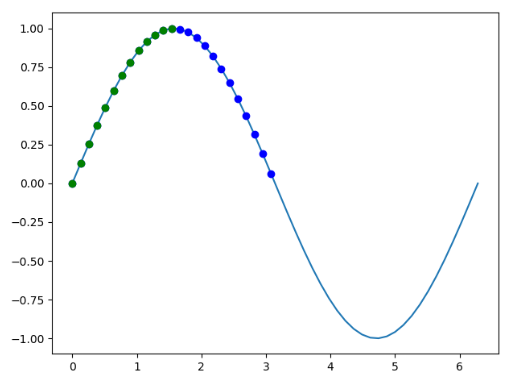
import numpy as np
import matplotlib.pyplot as plt
x = np . linspace ( 0 , 2 * np . pi , 50 )
y = np . sin ( x )
print ( len ( x )) # 50
plt . plot ( x , y )
mask = y >= 0
print ( len ( x [ mask ])) # 25
print ( mask )
'''
[ True True True True True True True True True True True True
True True True True True True True True True True True True
True False False False False False False False False False False False
False False False False False False False False False False False False
False False]
'''
plt . plot ( x [ mask ], y [ mask ], 'bo' )
mask = np . logical_and ( y >= 0 , x <= np . pi / 2 )
print ( mask )
'''
[ True True True True True True True True True True True True
True False False False False False False False False False False False
False False False False False False False False False False False False
False False False False False False False False False False False False
False False]
'''
plt . plot ( x [ mask ], y [ mask ], 'go' )
plt . show ()
数组迭代 除了for循环,Numpy 还提供另外一种更为优雅的遍历方法。
apply_along_axis(func1d, axis, arr) Apply a function to 1-D slices along the given axis. 1
2
3
4
5
6
7
8
9
10
11
12
13
14
15
16
17
18
19
20
21
22
23
24
25
26
27
import numpy as np
x = np . array ([[ 11 , 12 , 13 , 14 , 15 ],
[ 16 , 17 , 18 , 19 , 20 ],
[ 21 , 22 , 23 , 24 , 25 ],
[ 26 , 27 , 28 , 29 , 30 ],
[ 31 , 32 , 33 , 34 , 35 ]])
y = np . apply_along_axis ( np . sum , 0 , x )
print ( y ) # [105 110 115 120 125]
y = np . apply_along_axis ( np . sum , 1 , x )
print ( y ) # [ 65 90 115 140 165]
y = np . apply_along_axis ( np . mean , 0 , x )
print ( y ) # [21. 22. 23. 24. 25.]
y = np . apply_along_axis ( np . mean , 1 , x )
print ( y ) # [13. 18. 23. 28. 33.]
def my_func ( x ):
return ( x [ 0 ] + x [ - 1 ]) * 0.5
y = np . apply_along_axis ( my_func , 0 , x )
print ( y ) # [21. 22. 23. 24. 25.]
y = np . apply_along_axis ( my_func , 1 , x )
print ( y ) # [13. 18. 23. 28. 33.]
数组操作 更改形状 numpy.ndarray.shape表示数组的维度,返回一个元组,这个元组的长度就是维度的数目,即 ndim 属性(秩)。
numpy.ndarray.flat 将数组转换为一维的迭代器,可以用for访问数组每一个元素。
1
2
3
4
5
6
7
8
9
10
11
x = np . array ([[ 11 , 12 , 13 , 14 , 15 ],
[ 16 , 17 , 18 , 19 , 20 ],
[ 21 , 22 , 23 , 24 , 25 ],
[ 26 , 27 , 28 , 29 , 30 ],
[ 31 , 32 , 33 , 34 , 35 ]])
y = x . flat
print ( y )
# <numpy.flatiter object at 0x0000020F9BA10C60>
for i in y :
print ( i , end = ' ' )
# 11 12 13 14 15 16 17 18 19 20 21 22 23 24 25 26 27 28 29 30 31 32 33 34 35
numpy.ndarray.flatten([order='C']) 将数组的副本转换为一维数组,并返回。
order:‘C’ – 按行,‘F’ – 按列,‘A’ – 原顺序,‘k’ – 元素在内存中的出现顺序。(简记) order:{‘C / F,‘A,K},可选使用此索引顺序读取a的元素。‘C’意味着以行大的C风格顺序对元素进行索引,最后一个轴索引会更改F表示以列大的Fortran样式顺序索引元素,其中第一个索引变化最快,最后一个索引变化最快。请注意,‘C’和’F’选项不考虑基础数组的内存布局,仅引用轴索引的顺序.A’表示如果a为Fortran,则以类似Fortran的索引顺序读取元素在内存中连续,否则类似C的顺序。“ K”表示按照步序在内存中的顺序读取元素,但步幅为负时反转数据除外。默认情况下,使用Cindex顺序。 flatten()函数返回的是拷贝。
1
2
3
4
5
6
7
8
9
x = np . array ([[ 11 , 12 , 13 , 14 , 15 ],
[ 16 , 17 , 18 , 19 , 20 ],
[ 21 , 22 , 23 , 24 , 25 ],
[ 26 , 27 , 28 , 29 , 30 ],
[ 31 , 32 , 33 , 34 , 35 ]])
y = x . flatten ()
print ( y )
# [11 12 13 14 15 16 17 18 19 20 21 22 23 24 25 26 27 28 29 30 31 32 33 34
# 35]
numpy.ravel(a, order='C')Return a contiguous flattened array.
ravel()返回的是视图。
1
2
3
4
5
6
7
8
9
10
11
12
13
14
15
16
17
x = np . array ([[ 11 , 12 , 13 , 14 , 15 ],
[ 16 , 17 , 18 , 19 , 20 ],
[ 21 , 22 , 23 , 24 , 25 ],
[ 26 , 27 , 28 , 29 , 30 ],
[ 31 , 32 , 33 , 34 , 35 ]])
y = np . ravel ( x )
print ( y )
# [11 12 13 14 15 16 17 18 19 20 21 22 23 24 25 26 27 28 29 30 31 32 33 34
# 35]
y [ 3 ] = 0
print ( x )
# [[11 12 13 0 15]
# [16 17 18 19 20]
# [21 22 23 24 25]
# [26 27 28 29 30]
# [31 32 33 34 35]]
numpy.reshape(a, newshape[, order='C'])在不更改数据的情况下为数组赋予新的形状。
reshape()函数当参数newshape = [rows,-1]时,将根据行数自动确定列数。
1
2
3
4
5
6
7
8
9
10
11
12
13
x = np . arange ( 12 )
y = np . reshape ( x , [ 3 , 4 ])
print ( y . dtype ) # int32
print ( y )
# [[ 0 1 2 3]
# [ 4 5 6 7]
# [ 8 9 10 11]]
y = np . reshape ( x , [ 3 , - 1 ])
print ( y )
# [[ 0 1 2 3]
# [ 4 5 6 7]
# [ 8 9 10 11]]
reshape()函数当参数newshape = -1时,表示将数组降为一维。
1
2
3
4
5
6
7
8
9
10
x = np . random . randint ( 12 , size = [ 2 , 2 , 3 ])
print ( x )
# [[[11 9 1]
# [ 1 10 3]]
#
# [[ 0 6 1]
# [ 4 11 3]]]
y = np . reshape ( x , - 1 )
print ( y )
# [11 9 1 1 10 3 0 6 1 4 11 3]
数组转置 numpy.transpose(a, axes=None) Permute the dimensions of an array.numpy.ndarray.T Same as self.transpose(), except that self is returned if self.ndim < 2.更改维度 当创建一个数组之后,还可以给它增加一个维度,这在矩阵计算中经常会用到。
numpy.newaxis = None None的别名,对索引数组很有用。 1
2
3
4
5
6
7
8
9
10
11
12
13
14
15
16
17
18
19
x = np . array ([ 1 , 2 , 9 , 4 , 5 , 6 , 7 , 8 ])
print ( x . shape ) # (8,)
print ( x ) # [1 2 9 4 5 6 7 8]
y = x [ np . newaxis , :]
print ( y . shape ) # (1, 8)
print ( y ) # [[1 2 9 4 5 6 7 8]]
y = x [:, np . newaxis ]
print ( y . shape ) # (8, 1)
print ( y )
# [[1]
# [2]
# [9]
# [4]
# [5]
# [6]
# [7]
# [8]]
numpy.squeeze(a, axis=None) 从数组的形状中删除单维度条目,即把shape中为1的维度去掉。
a表示输入的数组;axis用于指定需要删除的维度,但是指定的维度必须为单维度,否则将会报错;数组组合 如果要将两份数据组合到一起,就需要拼接操作。
numpy.concatenate((a1, a2, ...), axis=0, out=None) Join a sequence of arrays along an existing axis.1
2
3
4
5
6
7
8
9
x = np . array ([ 1 , 2 , 3 ])
y = np . array ([ 7 , 8 , 9 ])
z = np . concatenate ([ x , y ])
print ( z )
# [1 2 3 7 8 9]
z = np . concatenate ([ x , y ], axis = 0 )
print ( z )
# [1 2 3 7 8 9]
numpy.stack(arrays, axis=0, out=None)Join a sequence of arrays along a new axis.
 1
 2
 3
 4
 5
 6
 7
 8
 9
10
11
12
13
14
x = np . array ([ 1 , 2 , 3 ])
y = np . array ([ 7 , 8 , 9 ])
z = np . stack ([ x , y ])
print ( z . shape ) # (2, 3)
print ( z )
# [[1 2 3]
# [7 8 9]]
z = np . stack ([ x , y ], axis = 1 )
print ( z . shape ) # (3, 2)
print ( z )
# [[1 7]
# [2 8]
# [3 9]]
1
2
3
4
5
6
7
8
9
10
11
12
13
14
15
16
17
18
19
20
21
22
23
import numpy as np
x = np . array ([ 1 , 2 , 3 ]) . reshape ( 1 , 3 )
y = np . array ([ 7 , 8 , 9 ]) . reshape ( 1 , 3 )
z = np . stack ([ x , y ])
print ( z . shape ) # (2, 1, 3)
print ( z )
# [[[1 2 3]]
#
# [[7 8 9]]]
z = np . stack ([ x , y ], axis = 1 )
print ( z . shape ) # (1, 2, 3)
print ( z )
# [[[1 2 3]
# [7 8 9]]]
z = np . stack ([ x , y ], axis = 2 )
print ( z . shape ) # (1, 3, 2)
print ( z )
# [[[1 7]
# [2 8]
# [3 9]]]
numpy.vstack(tup)Stack arrays in sequence vertically (row wise).numpy.hstack(tup)Stack arrays in sequence horizontally (column wise).数组拆分 numpy.split(ary, indices_or_sections, axis=0) Split an array into multiple sub-arrays as views into ary.
 1
 2
 3
 4
 5
 6
 7
 8
 9
10
11
12
13
14
15
16
17
18
19
import numpy as np
x = np . array ([[ 11 , 12 , 13 , 14 ],
[ 16 , 17 , 18 , 19 ],
[ 21 , 22 , 23 , 24 ]])
y = np . split ( x , [ 1 , 3 ])
print ( y )
# [array([[11, 12, 13, 14]]), array([[16, 17, 18, 19],
# [21, 22, 23, 24]]), array([], shape=(0, 4), dtype=int32)]
y = np . split ( x , [ 1 , 3 ], axis = 1 )
print ( y )
# [array([[11],
# [16],
# [21]]), array([[12, 13],
# [17, 18],
# [22, 23]]), array([[14],
# [19],
# [24]])]
numpy.vsplit(ary, indices_or_sections) Split an array into multiple sub-arrays vertically (row-wise).
垂直切分是把数组按照高度切分
1
2
3
4
5
6
7
8
9
10
11
12
13
import numpy as np
x = np . array ([[ 11 , 12 , 13 , 14 ],
[ 16 , 17 , 18 , 19 ],
[ 21 , 22 , 23 , 24 ]])
y = np . vsplit ( x , 3 )
print ( y )
# [array([[11, 12, 13, 14]]), array([[16, 17, 18, 19]]), array([[21, 22, 23, 24]])]
y = np . split ( x , [ 1 , 3 ], axis = 0 )
print ( y )
# [array([[11, 12, 13, 14]]), array([[16, 17, 18, 19],
# [21, 22, 23, 24]]), array([], shape=(0, 4), dtype=int32)]
numpy.hsplit(ary, indices_or_sections) Split an array into multiple sub-arrays horizontally (column-wise).
数组平铺 numpy.tile(A, reps) Construct an array by repeating A the number of times given by reps.tile是瓷砖的意思,顾名思义,这个函数就是把数组像瓷砖一样铺展开来。
将原矩阵横向、纵向地复制。
 1
 2
 3
 4
 5
 6
 7
 8
 9
10
11
12
13
14
15
16
17
18
19
20
21
22
23
24
25
26
27
28
29
import numpy as np
x = np . array ([[ 1 , 2 ], [ 3 , 4 ]])
print ( x )
# [[1 2]
# [3 4]]
y = np . tile ( x , ( 1 , 3 ))
print ( y )
# [[1 2 1 2 1 2]
# [3 4 3 4 3 4]]
y = np . tile ( x , ( 3 , 1 ))
print ( y )
# [[1 2]
# [3 4]
# [1 2]
# [3 4]
# [1 2]
# [3 4]]
y = np . tile ( x , ( 3 , 3 ))
print ( y )
# [[1 2 1 2 1 2]
# [3 4 3 4 3 4]
# [1 2 1 2 1 2]
# [3 4 3 4 3 4]
# [1 2 1 2 1 2]
# [3 4 3 4 3 4]]
添加和删除元素 numpy.unique(ar, return_index=False, return_inverse=False,return_counts=False, axis=None) Find the unique elements of an array.
return_index:the indices of the input array that give the unique values return_inverse:the indices of the unique array that reconstruct the input array return_counts:the number of times each unique value comes up in the input array 1
2
3
4
a = np . array ([ 1 , 1 , 2 , 3 , 3 , 4 , 4 ])
b = np . unique ( a , return_counts = True )
print ( b [ 0 ][ list ( b [ 1 ]) . index ( 1 )])
#2
数学函数 numpy.add(x1, x2, *args, **kwargs) Add arguments element-wise.
numpy.subtract(x1, x2, *args, **kwargs) Subtract arguments element-wise.
numpy.multiply(x1, x2, *args, **kwargs) Multiply arguments element-wise.
numpy.divide(x1, x2, *args, **kwargs) Returns a true division of the inputs, element-wise.
numpy.floor_divide(x1, x2, *args, **kwargs) Return the largest integer smaller or equal to the division of the inputs.
numpy.power(x1, x2, *args, **kwargs) First array elements raised to powers from second array, element-wise.
numpy.sqrt(x, *args, **kwargs) Return the non-negative square-root of an array, element-wise.
numpy.square(x, *args, **kwargs) Return the element-wise square of the input.
numpy.sin(x, *args, **kwargs) Trigonometric sine, element-wise.
numpy.cos(x, *args, **kwargs) Cosine element-wise.
numpy.tan(x, *args, **kwargs) Compute tangent element-wise.
numpy.arcsin(x, *args, **kwargs) Inverse sine, element-wise.
numpy.arccos(x, *args, **kwargs) Trigonometric inverse cosine, element-wise.
numpy.arctan(x, *args, **kwargs) Trigonometric inverse tangent, element-wise.
numpy.exp(x, *args, **kwargs) Calculate the exponential of all elements in the input array.
numpy.log(x, *args, **kwargs) Natural logarithm, element-wise.
numpy.exp2(x, *args, **kwargs) Calculate 2**p for all p in the input array.
numpy.log2(x, *args, **kwargs) Base-2 logarithm of x.
numpy.log10(x, *args, **kwargs) Return the base 10 logarithm of the input array, element-wise.
加法函数、乘法函数 numpy.sum numpy.sum(a[, axis=None, dtype=None, out=None, …]) Sum of array elements over a given axis.通过不同的 axis,numpy 会沿着不同的方向进行操作:如果不设置,那么对所有的元素操作;如果axis=0,则沿着纵轴进行操作;axis=1,则沿着横轴进行操作。但这只是简单的二位数组,如果是多维的呢?可以总结为一句话:设axis=i,则 numpy 沿着第i个下标变化的方向进行操作。
numpy.cumsum numpy.cumsum(a, axis=None, dtype=None, out=None) Return the cumulative sum of the elements along a given axis.聚合函数 是指对一组值(比如一个数组)进行操作,返回一个单一值作为结果的函数。因而,求数组所有元素之和的函数就是聚合函数。ndarray类实现了多个这样的函数。
numpy.prod 乘积 numpy.prod(a[, axis=None, dtype=None, out=None, …]) Return the product of array elements over a given axis.numpy.cumprod 累乘 numpy.cumprod(a, axis=None, dtype=None, out=None) Return the cumulative product of elements along a given axis.numpy.diff 差值 The first difference is given by out[i] = a[i+1] - a[i] along the given axis, higher differences are calculated by using diff recursively.
四舍五入 numpy.around(a, decimals=0, out=None) Evenly round to the given number of decimals.
numpy.ceil 上限 numpy.floor 下限 numpy.ceil(x, *args, **kwargs) Return the ceiling of the input, element-wise.numpy.floor(x, *args, **kwargs) Return the floor of the input, element-wise. 1
2
3
4
5
6
7
8
9
10
11
12
13
14
15
16
17
x = np . random . rand ( 3 , 3 ) * 10
print ( x )
# [[0.67847795 1.33073923 4.53920122]
# [7.55724676 5.88854047 2.65502046]
# [8.67640444 8.80110812 5.97528726]]
y = np . ceil ( x )
print ( y )
# [[1. 2. 5.]
# [8. 6. 3.]
# [9. 9. 6.]]
y = np . floor ( x )
print ( y )
# [[0. 1. 4.]
# [7. 5. 2.]
# [8. 8. 5.]]
杂项 numpy.clip 裁剪 numpy.clip(a, a_min, a_max, out=None, **kwargs): Clip (limit) the values in an array. 1
2
3
4
5
6
7
8
9
10
11
12
x = np . array ([[ 11 , 12 , 13 , 14 , 15 ],
[ 16 , 17 , 18 , 19 , 20 ],
[ 21 , 22 , 23 , 24 , 25 ],
[ 26 , 27 , 28 , 29 , 30 ],
[ 31 , 32 , 33 , 34 , 35 ]])
y = np . clip ( x , a_min = 20 , a_max = 30 )
print ( y )
# [[20 20 20 20 20]
# [20 20 20 20 20]
# [21 22 23 24 25]
# [26 27 28 29 30]
# [30 30 30 30 30]]
numpy.absolute 绝对值 numpy.abs numpy.absolute(x, *args, **kwargs) Calculate the absolute value element-wise.numpy.abs(x, *args, **kwargs) is a shorthand for this function. 1
2
3
4
5
6
7
8
9
10
11
x = np . arange ( - 5 , 5 )
print ( x )
# [-5 -4 -3 -2 -1 0 1 2 3 4]
y = np . abs ( x )
print ( y )
# [5 4 3 2 1 0 1 2 3 4]
y = np . absolute ( x )
print ( y )
# [5 4 3 2 1 0 1 2 3 4]
numpy.sign 返回数字符号的逐元素指示 numpy.sign(x, *args, **kwargs) Returns an element-wise indication of the sign of a number.1
2
3
4
5
x = np . arange ( - 5 , 5 )
print ( x )
#[-5 -4 -3 -2 -1 0 1 2 3 4]
print ( np . sign ( x ))
#[-1 -1 -1 -1 -1 0 1 1 1 1]
逻辑函数 真值测试 numpy.all(a, axis=None, out=None, keepdims=np._NoValue) Test whether all array elements along a given axis evaluate to True.numpy.any(a, axis=None, out=None, keepdims=np._NoValue) Test whether any array element along a given axis evaluates to True. 1
2
3
4
5
6
7
8
9
10
11
12
13
14
15
a = np . array ([ 0 , 4 , 5 ])
b = np . copy ( a )
print ( np . all ( a == b )) # True
print ( np . any ( a == b )) # True
b [ 0 ] = 1
print ( np . all ( a == b )) # False
print ( np . any ( a == b )) # True
print ( np . all ([ 1.0 , np . nan ])) # True
print ( np . any ([ 1.0 , np . nan ])) # True
a = np . eye ( 3 )
print ( np . all ( a , axis = 0 )) # [False False False]
print ( np . any ( a , axis = 0 )) # [ True True True]
数字内容 numpy.isnan(x, *args, **kwargs) Test element-wise for NaN and return result as a boolean array.【例】
1
2
3
a = np . array ([ 1 , 2 , np . nan ])
print ( np . isnan ( a ))
#[False False True]
逻辑运算 numpy.logical_not(x, *args, **kwargs)Compute the truth value of NOT x element-wise.numpy.logical_and(x1, x2, *args, **kwargs) Compute the truth value of x1 AND x2 element-wise.numpy.logical_or(x1, x2, *args, **kwargs)Compute the truth value of x1 OR x2 element-wise.numpy.logical_xor(x1, x2, *args, **kwargs)Compute the truth value of x1 XOR x2, element-wise. 1
2
3
4
5
6
7
8
9
10
11
12
13
14
15
16
17
18
19
20
21
22
23
24
25
26
27
28
29
30
31
32
33
34
35
36
37
38
39
print ( np . logical_not ( 3 ))
# False
print ( np . logical_not ([ True , False , 0 , 1 ]))
# [False True True False]
x = np . arange ( 5 )
print ( np . logical_not ( x < 3 ))
# [False False False True True]
【例】计算 x1 AND x2元素的真值 。
print ( np . logical_and ( True , False ))
# False
print ( np . logical_and ([ True , False ], [ True , False ]))
# [ True False]
print ( np . logical_and ( x > 1 , x < 4 ))
# [False False True True False]
【例】逐元素计算 x1 OR x2的真值 。
print ( np . logical_or ( True , False ))
# True
print ( np . logical_or ([ True , False ], [ False , False ]))
# [ True False]
print ( np . logical_or ( x < 1 , x > 3 ))
# [ True False False False True]
【例】计算 x1 XOR x2的真值 ,按元素计算。
print ( np . logical_xor ( True , False ))
# True
print ( np . logical_xor ([ True , True , False , False ], [ True , False , True , False ]))
# [False True True False]
print ( np . logical_xor ( x < 1 , x > 3 ))
# [ True False False False True]
print ( np . logical_xor ( 0 , np . eye ( 2 )))
# [[ True False]
# [False True]]
对照 numpy.greater(x1, x2, *args, **kwargs) Return the truth value of (x1 > x2) element-wise.numpy.greater_equal(x1, x2, *args, **kwargs) Return the truth value of (x1 >= x2) element-wise.numpy.equal(x1, x2, *args, **kwargs) Return (x1 == x2) element-wise.numpy.not_equal(x1, x2, *args, **kwargs) Return (x1 != x2) element-wise.numpy.less(x1, x2, *args, **kwargs) Return the truth value of (x1 < x2) element-wise.numpy.less_equal(x1, x2, *args, **kwargs) Return the truth value of (x1 =< x2) element-wise. 1
2
3
4
5
6
7
8
9
10
11
12
13
14
15
16
17
18
19
20
21
22
23
24
25
26
27
28
29
30
31
x = np . array ([ 1 , 2 , 3 , 4 , 5 , 6 , 7 , 8 ])
y = x > 2
print ( y )
print ( np . greater ( x , 2 ))
# [False False True True True True True True]
y = x >= 2
print ( y )
print ( np . greater_equal ( x , 2 ))
# [False True True True True True True True]
y = x == 2
print ( y )
print ( np . equal ( x , 2 ))
# [False True False False False False False False]
y = x != 2
print ( y )
print ( np . not_equal ( x , 2 ))
# [ True False True True True True True True]
y = x < 2
print ( y )
print ( np . less ( x , 2 ))
# [ True False False False False False False False]
y = x <= 2
print ( y )
print ( np . less_equal ( x , 2 ))
# [ True True False False False False False False]
numpy.isclose(a, b, rtol=1.e-5, atol=1.e-8, equal_nan=False) Returns a boolean array where two arrays are element-wise equal within a tolerance.numpy.allclose(a, b, rtol=1.e-5, atol=1.e-8, equal_nan=False) Returns True if two arrays are element-wise equal within a tolerance.numpy.allclose() 等价于 numpy.all(isclose(a, b, rtol=rtol, atol=atol, equal_nan=equal_nan))。
The tolerance values are positive, typically very small numbers. The relative difference (rtol * abs(b)) and the absolute difference atol are added together to compare against the absolute difference between a and b.
判断是否为True的计算依据:
1
2
3
4
np . absolute ( a - b ) <= ( atol + rtol * absolute ( b ))
- atol : float ,绝对公差。
- rtol : float ,相对公差。
NaNs are treated as equal if they are in the same place and if equal_nan=True. Infs are treated as equal if they are in the same place and of the same sign in both arrays.
排序,搜索和计数 排序 numpy.sort(a[, axis=-1, kind='quicksort', order=None]) Return a sorted copy of an array.
axis:排序沿数组的(轴)方向,0表示按行,1表示按列,None表示展开来排序,默认为-1,表示沿最后的轴排序。
kind:排序的算法,提供了快排’quicksort’、混排’mergesort’、堆排’heapsort’, 默认为‘quicksort’。
order:排序的字段名,可指定字段排序,默认为None。
numpy.argsort(a[, axis=-1, kind='quicksort', order=None]) Returns the indices that would sort an array.
numpy.lexsort(keys[, axis=-1]) Perform an indirect stable sort using a sequence of keys.(使用键序列执行间接稳定排序。)
给定多个可以在电子表格中解释为列的排序键,lexsort返回一个整数索引数组,该数组描述了按多个列排序的顺序。序列中的最后一个键用于主排序顺序,倒数第二个键用于辅助排序顺序,依此类推。keys参数必须是可以转换为相同形状的数组的对象序列。如果为keys参数提供了2D数组,则将其行解释为排序键,并根据最后一行,倒数第二行等进行排序。
numpy.partition(a, kth, axis=-1, kind='introselect', order=None) Return a partitioned copy of an array.
Creates a copy of the array with its elements rearranged in such a way that the value of the element in k-th position is in the position it would be in a sorted array. All elements smaller than the k-th element are moved before this element and all equal or greater are moved behind it. The ordering of the elements in the two partitions is undefined.
numpy.argpartition(a, kth, axis=-1, kind='introselect', order=None)Perform an indirect partition along the given axis using the algorithm specified by the kind keyword. It returns an array of indices of the same shape as a that index data along the given axis in partitioned order.
搜索 numpy.argmax(a[, axis=None, out=None])Returns the indices of the maximum values along an axis.
numpy.argmin(a[, axis=None, out=None])Returns the indices of the minimum values along an axis.
numppy.nonzero(a) Return the indices of the elements that are non-zero.
1
2
3
4
5
6
7
8
9
10
11
12
13
14
15
16
17
import numpy as np
x = np . array ([ 0 , 2 , 3 ])
print ( x ) # [0 2 3]
print ( x . shape ) # (3,)
print ( x . ndim ) # 1
y = np . nonzero ( x )
print ( y ) # (array([1, 2], dtype=int64),)
print ( np . array ( y )) # [[1 2]]
print ( np . array ( y ) . shape ) # (1, 2)
print ( np . array ( y ) . ndim ) # 2
print ( np . transpose ( y ))
# [[1]
# [2]]
print ( x [ np . nonzero ( x )])
#[2, 3]
numpy.where(condition, [x=None, y=None]) Return elements chosen from x or y depending on condition.【例】满足条件condition,输出x,不满足输出y。
numpy.searchsorted(a, v[, side='left', sorter=None]) Find indices where elements should be inserted to maintain order.
a:一维输入数组。当sorter参数为None的时候,a必须为升序数组;否则,sorter不能为空,存放a中元素的index,用于反映a数组的升序排列方式。 v:插入a数组的值,可以为单个元素,list或者ndarray。 side:查询方向,当为left时,将返回第一个符合条件的元素下标;当为right时,将返回最后一个符合条件的元素下标。 sorter:一维数组存放a数组元素的 index,index 对应元素为升序。 1
2
3
4
5
6
7
8
9
10
11
12
13
14
15
16
17
18
19
20
21
22
23
24
25
26
27
28
29
30
31
32
33
34
35
36
37
38
import numpy as np
x = np . array ([ 0 , 1 , 5 , 9 , 11 , 18 , 26 , 33 ])
y = np . searchsorted ( x , 15 )
print ( y ) # 5
y = np . searchsorted ( x , 15 , side = 'right' )
print ( y ) # 5
y = np . searchsorted ( x , - 1 )
print ( y ) # 0
y = np . searchsorted ( x , - 1 , side = 'right' )
print ( y ) # 0
y = np . searchsorted ( x , 35 )
print ( y ) # 8
y = np . searchsorted ( x , 35 , side = 'right' )
print ( y ) # 8
y = np . searchsorted ( x , 11 )
print ( y ) # 4
y = np . searchsorted ( x , 11 , side = 'right' )
print ( y ) # 5
y = np . searchsorted ( x , 0 )
print ( y ) # 0
y = np . searchsorted ( x , 0 , side = 'right' )
print ( y ) # 1
y = np . searchsorted ( x , 33 )
print ( y ) # 7
y = np . searchsorted ( x , 33 , side = 'right' )
print ( y ) # 8
计数 numpy.count_nonzero(a, axis=None) Counts the number of non-zero values in the array a.
集合操作 构造集合 numpy.unique(ar, return_index=False, return_inverse=False, return_counts=False, axis=None) Find the unique elements of an array.
return_index=True 表示返回新列表元素在旧列表中的位置。return_inverse=True表示返回旧列表元素在新列表中的位置。return_counts=True表示返回新列表元素在旧列表中出现的次数。 1
2
3
4
5
6
7
8
9
10
11
12
13
14
15
16
17
18
19
20
21
22
23
24
25
26
27
28
29
30
31
32
33
import numpy as np
x = np . unique ([ 1 , 1 , 3 , 2 , 3 , 3 ])
print ( x ) # [1 2 3]
x = sorted ( set ([ 1 , 1 , 3 , 2 , 3 , 3 ]))
print ( x ) # [1, 2, 3]
x = np . array ([[ 1 , 1 ], [ 2 , 3 ]])
u = np . unique ( x )
print ( u ) # [1 2 3]
x = np . array ([[ 1 , 0 , 0 ], [ 1 , 0 , 0 ], [ 2 , 3 , 4 ]])
y = np . unique ( x , axis = 0 )
print ( y )
# [[1 0 0]
# [2 3 4]]
x = np . array ([ 'a' , 'b' , 'b' , 'c' , 'a' ])
u , index = np . unique ( x , return_index = True )
print ( u ) # ['a' 'b' 'c']
print ( index ) # [0 1 3]
print ( x [ index ]) # ['a' 'b' 'c']
x = np . array ([ 1 , 2 , 6 , 4 , 2 , 3 , 2 ])
u , index = np . unique ( x , return_inverse = True )
print ( u ) # [1 2 3 4 6]
print ( index ) # [0 1 4 3 1 2 1]
print ( u [ index ]) # [1 2 6 4 2 3 2]
u , count = np . unique ( x , return_counts = True )
print ( u ) # [1 2 3 4 6]
print ( count ) # [1 3 1 1 1]
布尔运算 numpy.in1d(ar1, ar2, assume_unique=False, invert=False) Test whether each element of a 1-D array is also present in a second array.Returns a boolean array the same length as ar1 that is True where an element of ar1 is in ar2 and False otherwise.
 1
 2
 3
 4
 5
 6
 7
 8
 9
10
11
import numpy as np
test = np . array ([ 0 , 1 , 2 , 5 , 0 ])
states = [ 0 , 2 ]
mask = np . in1d ( test , states )
print ( mask ) # [ True False True False True]
print ( test [ mask ]) # [0 2 0]
mask = np . in1d ( test , states , invert = True )
print ( mask ) # [False True False True False]
print ( test [ mask ]) # [1 5]
交集
numpy.intersect1d(ar1, ar2, assume_unique=False, return_indices=False) Find the intersection of two arrays.
并集
numpy.union1d(ar1, ar2) Find the union of two arrays.
Return the unique, sorted array of values that are in either of the two input arrays.
差集
numpy.setdiff1d(ar1, ar2, assume_unique=False) Find the set difference of two arrays.
Return the unique values in ar1 that are not in ar2.
异或
setxor1d(ar1, ar2, assume_unique=False) Find the set exclusive-or of two arrays.